
Xmaster Formula MT4 Indicator Free Download 2024
Introduction: Boost Your Trading with the Xmaster Formula MT4 Indicator
In the ever-evolving world of forex trading, having reliable tools to guide your decisions is crucial. The Xmaster Formula MT4 Indicator offers an advanced, yet easy-to-use solution for identifying trends, buy/sell signals, and potential market reversals. Combining the power of technical indicators like Moving Averages, RSI, MACD, and Bollinger Bands, this tool is a game-changer for both beginner and advanced traders. In this article, we’ll dive into the features and practical applications of the Xmaster Formula MT4 Indicator and explore how it can enhance your trading strategy in 2024.

What is the Xmaster Formula MT4 Indicator?
This MT4 Indicator is designed to help forex traders pinpoint key support and resistance levels, potential price reversals, and optimal entry/exit points. By integrating multiple indicators like Moving Averages, RSI, MACD, and Bollinger Bands, it provides precise signals that can aid in making informed trading decisions.
Key Features:
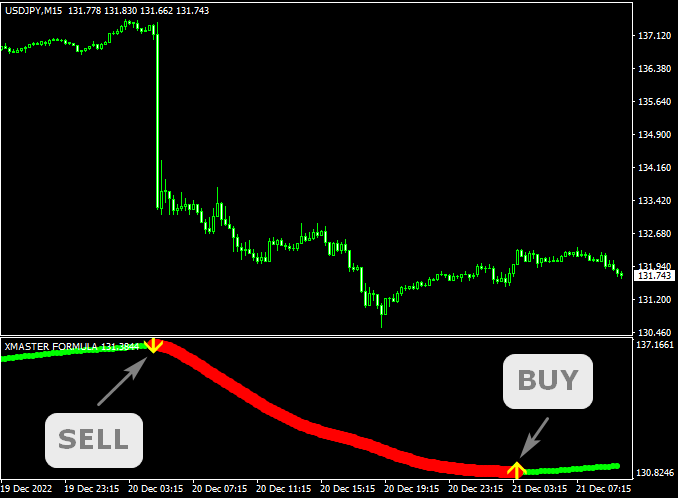
- BUY/SELL Signals: Arrows on the chart indicate potential buy and sell opportunities.
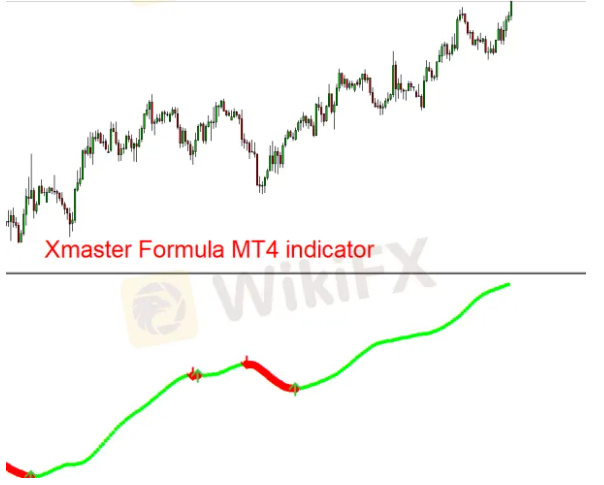
- Trend Confirmation: Uses color-coded signals to confirm bullish (green) and bearish (red) trends.
- No-Repaint Algorithm: Once a signal appears, it stays, ensuring reliable data.
- Compatible with MT4 and MT5: The Xmaster Formula MT4 Indicator works seamlessly with both platforms, with the latest version offering enhanced features.
How Does the Xmaster Formula MT4 Indicator Work?
This works by processing data from key technical indicators and outputting clear signals. When you see a yellow arrow pointing upwards, it signals a potential buy entry, while a downward yellow arrow suggests a sell signal. These signals are further validated by lime-colored dots (for bullish trends) and red-colored dots (for bearish trends).
Practical Application:
- Buy Signal: Enter a buy trade when the yellow up arrow appears, confirmed by lime-colored dots.
- Sell Signal: Enter a sell trade when the yellow down arrow appears, confirmed by red-colored dots.
- Exit Strategy: Close the trade when the opposite arrow appears, signaling a trend reversal.
By integrating the MT4 data feed, the Xmaster Formula MT4 Indicator ensures that traders have access to real-time, accurate market data for effective decision-making.
Using the Xmaster Formula MT4 Indicator: A Step-by-Step Guide
1. Installation in MT4
To begin using the Xmaster Formula MT4 Indicator, download the indicator file and install it in the Indicators folder of your MT4 platform. Restart MT4 and refresh the Navigator section to access the indicator.
2. How to Trade Using the Xmaster Formula MT4 Indicator
- Buy Strategy: Enter a buy position when two consecutive green arrows appear, indicating an uptrend. Place your stop loss at the previous swing low.
- Sell Strategy: Enter a sell position when two consecutive red arrows appear, signaling a downtrend. Place your stop loss at the previous swing high.
3. Confirmation and Exit
To enhance accuracy, always confirm the signals with other technical indicators like support/resistance levels or candlestick patterns. Exit the trade when the opposite signal appears.
Advantages of the Xmaster Formula MT4 Indicator
This is highly versatile and offers several benefits for forex traders:
- Works Across All Timeframes: Whether you’re a scalper or a long-term trader, this can be applied to any timeframe.
- Multi-Currency Pair Compatibility: Use it across all currency pairs, including majors, minors, and exotics.
- User-Friendly Interface: The indicator’s clear signals make it accessible to both novice and experienced traders.
- Customizable: Adjust the indicator settings to suit your personal trading strategy.
Disadvantages of the Xmaster Formula MT4 Indicator
While it have many advantages, it does come with a few drawbacks:
- Lagging Signals: Like many trend-following indicators, the Xmaster Formula MT4 Indicator may lag during fast-moving trends, resulting in delayed entry signals.
- False Signals in Low Volatility Markets: The indicator might generate false signals during sideways or low volatility conditions, leading to potential losses.
- Risk of Missed Opportunities: Due to its lagging nature, the indicator may sometimes miss the best entry points.

Xmaster Formula MT4 Indicator Trading Strategy Examples
Long Position Strategy:
- When this MT4 Indicator shows two consecutive upward arrows (green), it signals sustained upward momentum.
- Enter a buy trade when the second green arrow appears.
- Set your stop loss below the recent swing low and exit when the opposite sell signal (red arrow) appears.
Short Position Strategy:
- When the Xmaster Formula MT4 Indicator shows two consecutive downward arrows (red), it indicates a potential downtrend.
- Enter a sell trade when the second red arrow appears.
- Set your stop loss above the recent swing high and exit when the opposite buy signal (green arrow) appears.
Real-World Example of Using the Xmaster Formula MT4 Indicator
Here’s a practical example of how to use the Xmaster Formula MT4 Indicator in a trading scenario:
Long Position Example: When the Xmaster Formula MT4 Indicator prints two green arrows on a 15-minute chart for EUR/USD, it suggests the market is trending upwards. Enter a buy position at the opening of the next candle and place your stop loss below the previous swing low.
Short Position Example: When the indicator prints two red arrows, indicating a downtrend, enter a sell position with a stop loss above the previous swing high.

Xmaster formula indicator mt4 download : How to Download Instanly ?
If you’re ready to download the XMaster Formula MT4 Indicator for your MetaTrader 4 platform, getting started is simple and quick. To ensure you receive the most up-to-date and secure version of the indicator, we recommend chatting directly with our support team.
Why Chat with Support?
- Instant Response: Our support team is available 24/7 to provide you with a direct download link, ensuring you can start using the XMaster Formula Indicator without delay.
- Verified Link: By contacting support, you’ll receive a verified and safe download link, reducing the risk of downloading a corrupted or outdated file.
- Installation Assistance: If you encounter any issues during the download or installation process, our support team can guide you step-by-step, ensuring a smooth setup.
How to Contact Support:
- Click on the chat icon located at the bottom right corner of our website.
- Ask for the download link for the XMaster Formula Indicator MT4.
- Follow the instructions provided by the support team to download and install the indicator.
With instant support, you can start using the XMaster Formula MT4 Indicator on your MT4 platform quickly, enhancing your trading strategy with this powerful tool.
Conclusion
The Xmaster Formula MT4 Indicator is a powerful and versatile tool for forex traders looking to enhance their strategies with clear, actionable signals. Whether you’re a beginner or a seasoned professional, this trend-following indicator simplifies the process of identifying buy and sell signals. By integrating it with your MT4 data feed, you can maximize the potential of your forex trades. Remember to combine it with other technical analysis tools to confirm your signals and manage risk effectively.