Premium Amibroker Data Feed
Amibroker Data Feed: Premium Tick-by-Tick Data for Serious Traders
Real-time, tick-by-tick Amibroker data feed for Equity, Futures, Index Options, Commodities, and Currency, with unlimited symbols, 20-year EOD history, and 10 indicators built by our own team. Watch it in AmiBroker, our desktop app, Chrome, or our Android app, backed by support that's actually there at 2am on a Sunday, not just during market hours.
New users: first month ₹449, then ₹699/month. Includes tick data, 1 year of 1-min backfill and 20 years of EOD.
Trusted by Amibroker traders since 2019
24/7 WhatsApp & live chat
Instant activation, any time
Chrome & Android access
100msFeed refresh rate
365d1-min backfill
20yrEOD history
99.5%Uptime
What Is an Amibroker Data Feed, and Why Do You Need One?
AmiBroker is a charting and backtesting platform, but it doesn't come with its own market data. An Amibroker data feed is the separate service that streams live prices from the exchange into AmiBroker, so your charts, watchlists, and AFL strategies update in real time instead of sitting still. Without one, AmiBroker can only show delayed or historical data, which is unusable for intraday or options trading. A good feed also carries the backfill history needed to backtest a strategy before risking money on it.
Curious about the mechanics? Read how the delivery pipeline works or see what latency actually means for your results.
The Full Package
What You Get With the Amiprofits Amibroker Data Feed
AmiBroker doesn't come with its own market data. Here's everything included, at a glance.
- ▤Unlimited symbols, every major segmentEquity, futures, index options, commodities and currency, all on one plan, no per-segment charges.
- ⚡True tick-by-tick streamingFull OHLC, volume and open interest, refreshing up to 100 times a second, roughly every 10 milliseconds.
- ★10 in-house indicators, not a resold packBuilt and maintained by our own team, on top of a 5000+ free community library.
- ↻Connects to AmiBroker within secondsBacked by automated monitoring that flags and resolves issues before most users notice.

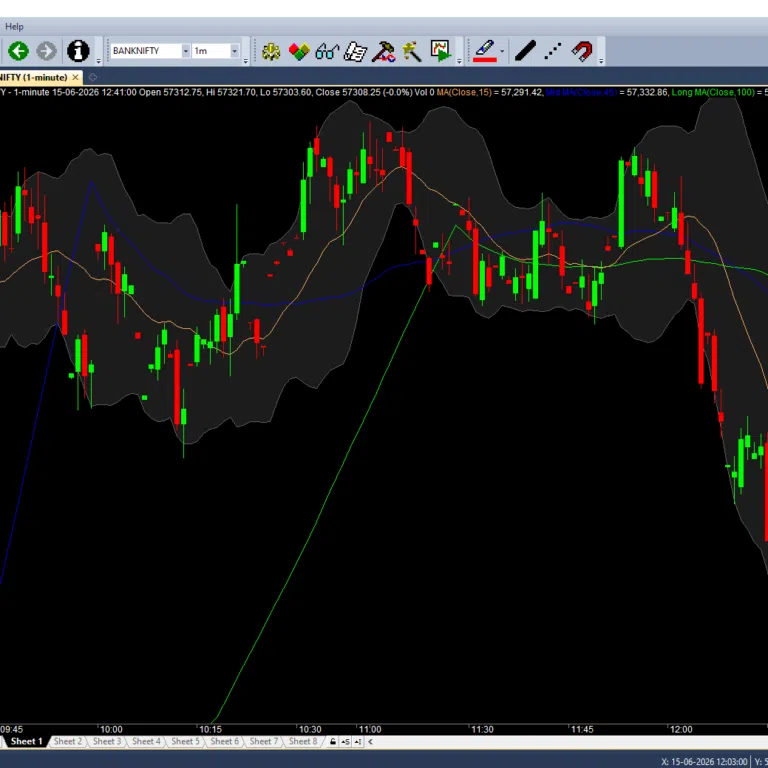
Traders using the Amiprofits data feed for Amibroker to track live tick-by-tick prices across multiple watchlists.
Watch It Anywhere
Access Your Data Feed From Anywhere
Most providers give you one option: a Windows desktop app. We built ours to work wherever you actually are.
Windows Desktop App
Windows 7+, 64-bit. The primary way most traders run AmiBroker with our feed, on a home PC, office machine, or VPS.
Chrome Web Access
Check live prices straight from your browser, the same way you'd glance at TradingView, no AmiBroker required.
Android App
Watch your watchlist from your phone when you're away from your desk, without needing a laptop nearby.
Activation is instant, no 1-2 hour wait after payment, on any of the three.
Full Market Coverage
Amibroker Data Feed Coverage by Segment
Equity, futures, index options, commodities and currency, included in one price, no per-segment add-on charges.
| Segment | Coverage | Backfill / History |
|---|---|---|
| Equity Cash | NSE cash market, unlimited symbols on watchlist | 1-min backfill for 365 days, EOD for 20 years |
| Equity Futures | Stock & index futures, current and near month | 1-min backfill for 365 days, EOD for 20 years |
| Index Options | Nifty, BankNifty, FinNifty, MidcapNifty, weekly & monthly, updated as contracts roll | 1-min backfill for the contract's active life |
| Commodities (MCX) | Crude oil, natural gas, gold, silver, and more | 1-min backfill for 365 days, EOD for 20 years |
| Currency | INR currency pairs | 1-min backfill for 365 days, EOD for 20 years |
| Stock Options (Add-on) | Individual stock F&O options, available on request | Extra cost, ask before subscribing |
⚠️
One exception: individual stock options (not index options) cost extra, on request. Ask us before subscribing if your strategy needs stock-level options.
Before You Install
System Requirements for Amibroker Traders
Runs on a standard Windows machine or a trading VPS. Here's what you need before you start the trial.
Operating System
Windows 7 or newer, 64-bit. AmiBroker itself is 32-bit software and runs fine under 64-bit Windows through the standard compatibility layer.
Memory & Storage
4GB RAM is enough for most single-segment watchlists; 8GB is more comfortable if you're running multiple segments with 20-year EOD history loaded.
VPS & Algo Trading
Works on any Windows VPS, so your AFL strategies and the feed keep running even when your own PC is off. No special configuration needed.
Not on Windows? Use the Chrome web access or Android app instead, both included on every plan.
Why Traders Switch to Us
Why Traders Are Choosing Amiprofits
Plenty of providers match us on symbol counts and backfill depth. Here's what most of them don't do.

Support When You Actually Need It
Most providers offer support during trading hours only. Ours runs around the clock on WhatsApp and live chat, including weekends.
Indicators Built by Our Own Team
5000+ free community indicators on every plan, plus 10 premium indicators built and maintained in-house, not licensed and resold.
Use Across Two Systems
Your license works alternately across two systems, office and home for example, rather than locking you to one machine.
AnyDesk-Assisted Installation
Our team will walk through installation with you over AnyDesk, plus a full video walkthrough if you'd rather self-install.

A sample of the free AFL library bundled with every data feed plan, on top of the 10 premium indicators built in-house.
Before You Ask
Advice From Our Support Team
Straight from the questions we field every week, not buried in a support call.
1
Unlimited symbols is a feed limit, not a PC limit
Your computer still has to render every live symbol. If AmiBroker feels like it's hanging, it's usually your system, not the feed. Trim your live watchlist on an older machine, and add the rest back for backtesting.
2
Backfill won't slow your PC the way live symbols can
The plan includes 1 year of 1-minute backfill and 20 years of end of day data. Backfill doesn't strain your system like a live watchlist does, so you can load as many symbols as your strategy needs for testing.
3
Use a paid AmiBroker license to stop re-downloading data
AmiBroker's free/trial mode doesn't retain your local database. On a paid edition, your backfilled history stays saved locally, so you're not re-pulling the same year of data every time.
The Honest Comparison
Amiprofits vs Other Amibroker Data Providers
A straight look at what you get, not a scorecard we wrote to always come out ahead.
| Feature | Amiprofits | Typical Providers |
|---|---|---|
| Symbols per Watchlist | Unlimited, no cap | 500-2500, often capped by plan tier |
| Refresh Speed | Up to 100 times/sec (~10ms) | Varies, often interval-based |
| 1-Minute Backfill | 365 days | 90-365 days, varies by provider |
| EOD History | 20 years | 5-20 years, varies by provider |
| Access Points | AmiBroker, desktop app, Chrome, Android | Windows desktop only, typically |
| Premium Indicators | 10 built in-house, included | Generic bundled packs, or sold separately |
| Activation | Instant after payment | Often 1-2 hours |
| Support Availability | 24/7 WhatsApp, live chat & AnyDesk | Business hours only, commonly 9am-9pm |
| VPS & Algo Trading | Runs on any Windows VPS, no extra setup | Often untested or unsupported on VPS |
| Segment Coverage | Equity, futures, index options, commodities & currency, one plan | Often split across separate paid add-ons |
| Monthly Price | ₹699/month, core segments included | ₹499-999/month depending on plan |
Amiprofits figures reflect current published plans. "Typical Providers" figures reflect publicly listed plans from other vendors, shown for general comparison. Amiprofits is priced as a premium tier: the difference is 24/7 support, multi-device access, and in-house indicators, not the lowest price in the category.
Simple, Transparent Pricing
Amibroker Data Feed Price in India
One plan, core segments included. The only separate charge is stock options data, on request.
- Unlimited symbols, all core segments
- Tick-by-tick live data, up to 100 updates/sec
- 1-year 1-minute backfill, 20-year EOD
- 10 in-house premium indicators
- 5000+ free community indicators
- Windows, Chrome & Android access
Monthly
₹699 / month
New users: first month ₹449, then ₹699/month.
Billed monthly, cancel anytime, instant activation
- Stock options (individual): available on request, extra cost
SAVE ~17%
Yearly
₹6999 / year
Works out to roughly ₹583/month
- Everything in the monthly plan, same core coverage
Real Traders, Real Tenure
Trusted by Traders Since 2019
Real subscribers with real tenure on the service, not fabricated reviews.
K
Karthikeyan
R
Ragav
R
Rohit
D
Divya
Four Simple Steps
How to Start Your Amibroker Data Feed Free Trial
1
Request Your Trial
Message us on WhatsApp or live chat and we'll set up your login the same day.
2
Install, However You Prefer
Follow the installation video yourself, or let our team install it with you over AnyDesk, on Windows 7 or above, 64-bit.
3
Trade on Live Data for 5 Days
Your trial runs 5 days, extended to 7 if a weekend falls inside it, so you get a full run of trading days to test the feed.
4
Subscribe, Activate Instantly
No 1-2 hour wait after payment. Not for you? Tell us during the trial. Ready? You're live the moment you pay.
Popular Resources
Helpful Amibroker Resources
Feedback is always welcome, before, during, or after your trial. Your experience is genuinely our first priority, not a line in a footer.
Start Free Trial
Download Amibroker and Live Feed App,
Watch Video Tutorial For Full Details

Download Now
Step 1
Click on get my login details now and fill the form , you will get demo login details to your email instantly
or Provide us your email in chat , We will send you login details
or Provide us your email in chat , We will send you login details

GET DEMO LOG IN DETAILS
Step 3
Plug & Play our data feeder and get ultra-fast, tick by tick data for Amibroker

RUN
Step 4